
The aim of this short guide is to use the CX App to configure two 6300 switches in VSF and then use Aruba Central to further configure and manage them along with dual 832X core switches in VSX formation.
Our CX switches are using 10.05.0020 but the minimum version required to be managed by Aruba Central is 10.04.0020.
The CX switches are connected to the network through their out of band mgmt. interfaces. Note that the main objective here is to show you the process even though the CX firmware version are outdated.
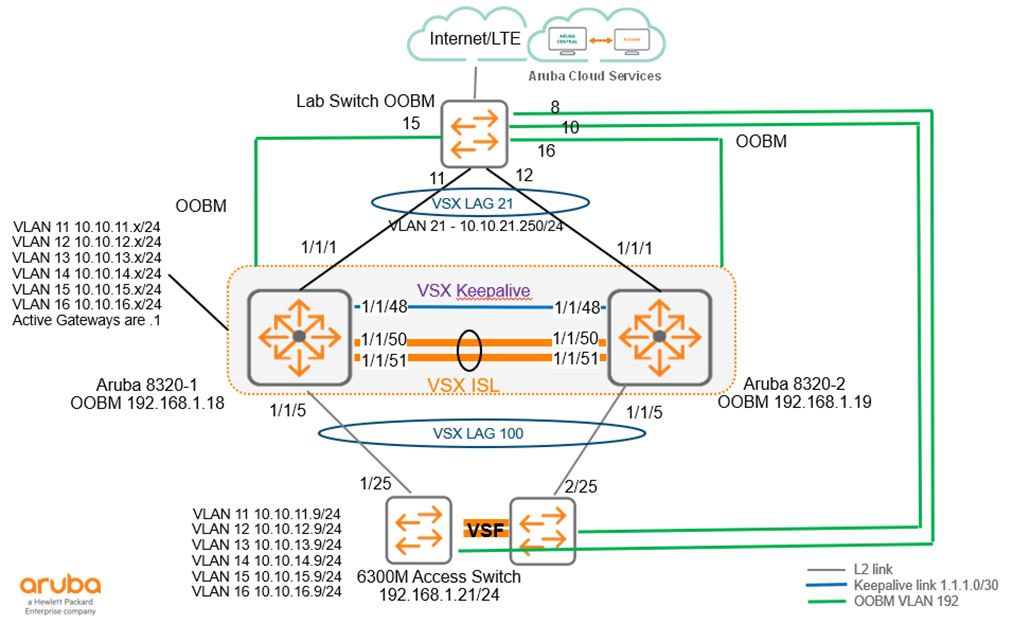
In the next post, I’ll share the template that I am using here for VSF and the core switches.

 Solutions Tech Lab
Leave a reply to Aruba Central Template configuration for VSF and Core Switches – Solutions Lab Cancel reply