
This is a short technote to highlight Air Slice which is one of the interesting optimisation features that is available on WIFI6 and WIFI6E Aruba APs. It optimises user experience and assures QoS for pre-defined group of applications which it provide traffic prioritisation.
Before we get into Air Slice, we’ll briefly cover Wi-Fi Multimedia (WMM).
Wi-Fi Multimedia
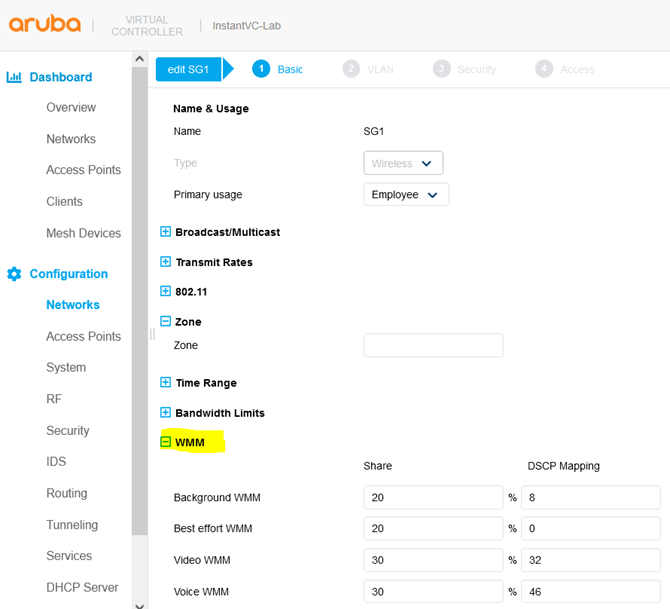
WMM is also known as WME, refers to a Wi-Fi Alliance interoperability certification, based on the IEEE 802.11e standard. It provides basic QoS features to IEEE 802.11 networks. WMM prioritises traffic according to four ACs: voice (AC_VO), video (AC_VI), best effort (AC_BE), and background (AC_BK).
And for Aruba Instant Aos, one would configure it at WLAN level as shown below.
Air slice
AirSlice that is supported on WiFi6 and 6E APs, optimises user experience to enterprise applications. Air Slice combines AppRF and UCC for classifying applications and it also supports custom flow definitions. Air Slice then uses a combination of priority queuing, dynamic WMM boosting, and 11ax based radio resource scheduling to prioritize enterprise applications in the presence of competing background traffic flows to meet latency and bandwidth requirements. Air Slice solution built on Orthogonal Frequency Division Multiple Access (OFDMA) and Target Wake Time (TWT) and MU-MIMO, to offer the following services:
- Guaranteed bit rate
- Battery life extension
- Bounded latency and jitter
Network administrators can also select a list of applications to be prioritised.
Air Slice uses Policy Enforcement Firewall and the layer 7 Deep Packet Inspection engine to identify these applications and utilise 802.11ax features OFDMA and TWT to optimise available RF resources to meet these real time application requirements.
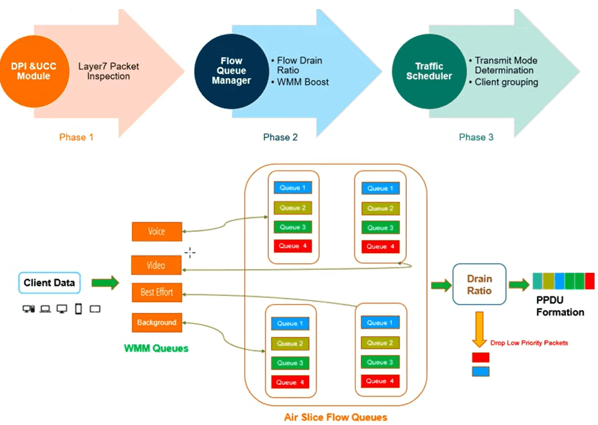
It basically will provide 4x additional queues for each of the 4x WMM queues. This will provide more granularity for providing application assurance.
Configuration
But before we enable AirSlice take a look at the current Look at the characterise the traffic on your network. Here we check the WMM queues on an IAP.
PS-Lvl1-b2:5b# show ap debug radio-stats | include WMM


Tx WMM [BK]                      186455

Tx WMM [BE]                      707596289

Tx WMM [VI]                      336715894

Tx WMM [VO]                      8169732

Tx WMM [BK] Dropped              42

Tx WMM [BE] Dropped              209435

Tx WMM [VI] Dropped              62710

Tx WMM [VO] Dropped              88680

Tx Auto WMM Boost Pkts           84846373

Rx WMM [BK]                      5783162

Rx WMM [BE]                      257747373

Rx WMM [VI]                      334091568

Rx WMM [VO]                      33072564


PS-Lvl1-b2:5b#
Now we’ll configure AirSlice.
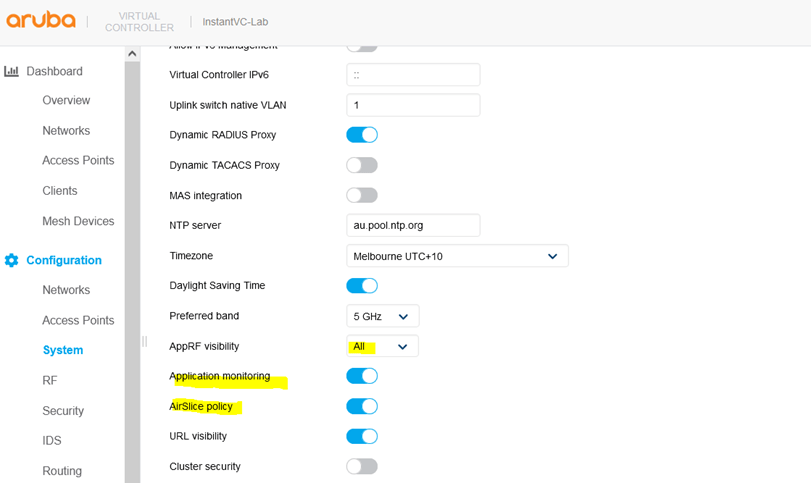
This is used to view the Application Monitoring list which will use to select a few applications from.
PS-Lvl1-b2:5b# sh app-monitoring list


telemetry sendcnt:0

Pre-defined Application Monitoring list

---------------------------------------

App Name             DPI AppID  Inner AppID

--------             ---------  -----------

zoom                 2928       0x0

slack                2889       0x1

|_amazon-chime       3205       0x1

skype                183        0x2

|_lync-online        1454       0x2

|_alg-skype4b-audio  4038       0x2

|_alg-skype4b-video  4039       0x2

webex                890        0x4

gotomeeting          889        0x5

office365            1448       0x6

|_excel-online       2748       0x6

|_onedrive           2820       0x6

|_outlook            1478       0x6

|_ms-planner         2712       0x6

|_powerpoint-online  3036       0x6

|_sharepoint-online  1453       0x6

|_ms-sway            2711       0x6

|_word-online        3035       0x6

|_yammer             519        0x6

dropbox              779        0x7

amazon-aws           1183       0x8

github               2559       0x9

ms-teams             3374       0x11

custom1              20000      0x14

custom2              20001      0x15

custom3              20002      0x16

custom4              20003      0x17

custom5              20004      0x18

alg-wifi-calling     4050       0x19


PS-Lvl1-b2:5b#
Now we get the list of MAC addresses of the clients.
PS-Lvl1-b2:5b# show clients


Client List

-----------

Name           IP Address     MAC Address        OS              ESSID  Access Point   Channel  Type  Role          IPv6 Address                             Signal    Speed (m               bps)

----           ----------     -----------        --              -----  ------------   -------  ----  ----          ------------                             ------    --------               ----

Mariana-s-S23  192.168.1.149  3a:63:31:ab:ca:d9  Linux           SG1    PS-Lvl1-b2:5b  52E      AC    Android       fd14:5f94:8156:2600:ec8a:da2c:9649:3ced  10(poor)  130(ok)

EPSON34E912    192.168.1.138  f8:d0:27:34:e9:12  Windows Mobile  SG1    PS-Lvl1-b2:5b  1        GN    EpsonPrinter  --                                       40(good)  52(good)

VKELONX1GR     192.168.1.146  b8:9a:2a:b4:a9:6a  Win 10          SG1    PS-Lvl1-b2:5b  52E      AC    Win10         fd14:5f94:8156:2600:74ea:1d4f:c434:39fb  47(good)  866(good               )

AriyaS20       192.168.1.147  da:24:7f:dc:08:7e  Linux           SG1    PS-Lvl1-b2:5b  52E      AC    Android       fd14:5f94:8156:2600:ad40:1be7:7ad5:d8f7  39(good)  433(good               )


Number of Clients   :4

Info timestamp      :11055512


PS-Lvl1-b2:5b#
We now refer to the pre-defined application monitoring list and note the dpi-id for a few of the.
office365            1448       0x6

|_excel-online       2748       0x6

|_onedrive           2820       0x6

|_outlook            1478       0x6

|_powerpoint-online  3036       0x6

|_sharepoint-online  1453       0x6

|_word-online        3035       0x6

|_yammer             519        0x6

ms-teams             3374       0x11

alg-wifi-calling     4050       0x19
Here we see the stats for dpi-id 1478 (MS office365).
PS-Lvl1-b2:5b# show ap debug airslice client-stats b8:9a:2a:b4:a9:6a  1448


Airslice client b8:9a:2a:b4:a9:6a dpi 1448 stats table

------------------------------------------------------

Index  Avg Delay  Avg Jitter  Loss pkts  TX pkts

-----  ---------  ----------  ---------  -------

0      935        39          0          15

1      487        0           0          3

2      613        38          0          38

3      604        4           0          4

4      523        0           0          2

6      568        1           0          3

7      643        10          0          3

8      1513       493         0          11

9      514        5           0          3

10     673        0           0          2

12     611        9           0          4

13     782        0           0          2

15     457        3           0          4

16     490        0           0          2

17     642        39          0          37

18     559        0           0          1

19     575        16          0          5

21     515        0           0          1

22     570        36          0          17

25     653        15          0          7

28     527        11          0          7


PS-Lvl1-b2:5b#
3374 is MS-Teams
PS-Lvl1-b2:5b# show ap debug airslice client-stats b8:9a:2a:b4:a9:6a  3374


Airslice client b8:9a:2a:b4:a9:6a dpi 3374 stats table

------------------------------------------------------

Index  Avg Delay  Avg Jitter  Loss pkts  TX pkts

-----  ---------  ----------  ---------  -------

PS-Lvl1-b2:5b# show ap debug airslice client-stats b8:9a:2a:b4:a9:6a  3374


Airslice client b8:9a:2a:b4:a9:6a dpi 3374 stats table

------------------------------------------------------

Index  Avg Delay  Avg Jitter  Loss pkts  TX pkts

-----  ---------  ----------  ---------  -------


PS-Lvl1-b2:5b#

PS-Lvl1-b2:5b#

PS-Lvl1-b2:5b# show ap debug airslice client-stats b8:9a:2a:b4:a9:6a  3374


Airslice client b8:9a:2a:b4:a9:6a dpi 3374 stats table

------------------------------------------------------

Index  Avg Delay  Avg Jitter  Loss pkts  TX pkts

-----  ---------  ----------  ---------  -------

1      582        0           0          2

3      522        0           0          1

5      574        0           0          1

7      538        0           0          1

8      461        0           0          1

9      638        24          0          8

11     461        0           0          1

13     855        0           0          1

14     614        8           0          3

15     571        0           0          1

17     550        0           0          1

19     420        0           0          1

21     538        0           0          1

23     695        48          0          18

25     524        0           0          2

27     563        0           0          2

28     547        0           0          1

29     692        0           0          1


PS-Lvl1-b2:5b# show ap debug airslice client-stats b8:9a:2a:b4:a9:6a  3374


Airslice client b8:9a:2a:b4:a9:6a dpi 3374 stats table

------------------------------------------------------

Index  Avg Delay  Avg Jitter  Loss pkts  TX pkts

-----  ---------  ----------  ---------  -------

0      611        0           0          2

1      791        45          0          9

2      505        0           0          3

3      587        0           0          1

4      552        0           0          2

6      577        0           0          1

8      629        11          0          6

12     554        0           0          2

16     597        0           0          2

19     655        9           0          3

20     513        0           0          2

24     507        0           0          2

26     628        12          0          4

28     583        0           0          2


PS-Lvl1-b2:5b#
You can also have up to 5x custom marks for the applications that are not part of the AirSice by default as shown.
PS-Lvl1-b2:5b# sh app-monitoring list


telemetry sendcnt:0

Pre-defined Application Monitoring list

---------------------------------------

App Name             DPI AppID  Inner AppID

--------             ---------  -----------

zoom                 2928       0x0

slack                2889       0x1

|_amazon-chime       3205       0x1

skype                183        0x2

|_lync-online        1454       0x2

|_alg-skype4b-audio  4038       0x2

|_alg-skype4b-video  4039       0x2

webex                890        0x4

gotomeeting          889        0x5

office365            1448       0x6

|_excel-online       2748       0x6

|_onedrive           2820       0x6

|_outlook            1478       0x6

|_ms-planner         2712       0x6

|_powerpoint-online  3036       0x6

|_sharepoint-online  1453       0x6

|_ms-sway            2711       0x6

|_word-online        3035       0x6

|_yammer             519        0x6

dropbox              779        0x7

amazon-aws           1183       0x8

github               2559       0x9

ms-teams             3374       0x11

custom1              20000      0x14

custom2              20001      0x15

custom3              20002      0x16

custom4              20003      0x17

custom5              20004      0x18

alg-wifi-calling     4050       0x19


PS-Lvl1-b2:5b#
Custom Marking
You can use these custom1-5 marks for your other applications.
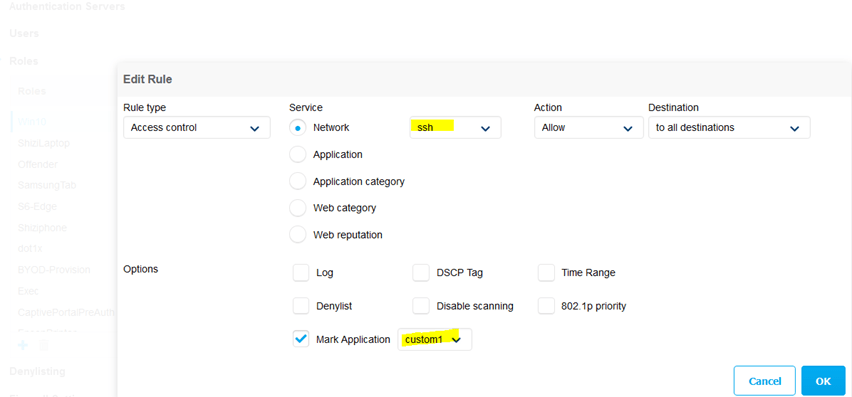
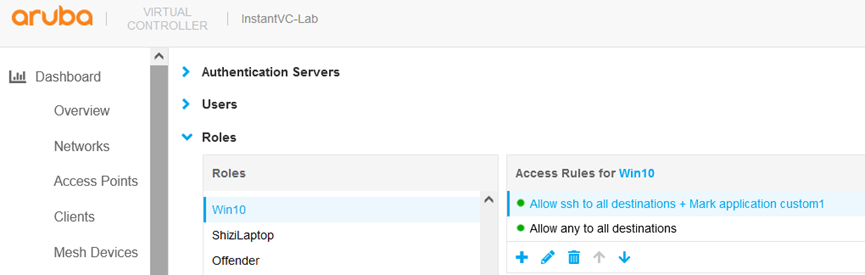
Now we’ll check it.
PS-Lvl1-b2:5b# show ap debug airslice client-stats b8:9a:2a:b4:a9:6a  20000


Airslice client b8:9a:2a:b4:a9:6a dpi 20000 stats table

-------------------------------------------------------

Index  Avg Delay  Avg Jitter  Loss pkts  TX pkts

-----  ---------  ----------  ---------  -------


PS-Lvl1-b2:5b# show ap debug airslice client-stats b8:9a:2a:b4:a9:6a  20000


Airslice client b8:9a:2a:b4:a9:6a dpi 20000 stats table

-------------------------------------------------------

Index  Avg Delay  Avg Jitter  Loss pkts  TX pkts

-----  ---------  ----------  ---------  -------

PS-Lvl1-b2:5b#


PS-Lvl1-b2:5b# show ap debug airslice client-stats b8:9a:2a:b4:a9:6a  20000


Airslice client b8:9a:2a:b4:a9:6a dpi 20000 stats table

-------------------------------------------------------

Index  Avg Delay  Avg Jitter  Loss pkts  TX pkts

-----  ---------  ----------  ---------  -------

0      644        13          0          24

1      806        42          0          14

3      2857       0           0          2

4      515        0           0          2

6      510        0           0          2

7      1402       0           0          2

9      476        0           0          2

10     524        0           0          2

12     697        0           0          2

13     484        0           0          2

15     498        0           0          2

16     455        0           0          2

18     523        0           0          2

19     467        0           0          2

21     753        0           0          2

22     493        0           0          2

24     3132       0           0          2

25     515        0           0          2

27     490        0           0          2

28     560        0           0          2

0      567        0           0          2


PS-Lvl1-b2:5b#
 Solutions Tech Lab
Leave a comment