
Wi-Fi calling service allows cellular users to make or receive calls using a Wi-Fi network instead of using the cellular network of the carrier. The users can make or receive calls and send text messages even when they are beyond a cellular coverage but have a Wi-Fi network coverage. Most major carriers around the world support Wi-Fi calling service.
WiFi calling uses DNS to query carrier’s Wi-Fi calling data gateway and then it establishes an IPSEC tunnel to it.
Based on the user guide link , by default we have pre-configured the following

Here is the full list in IAPs version 8.11.2.1
PS-Lvl1-b2:5b# sh wificall-dns-patterns


R - Read Only pattern
WiFi-Calling Dns Patterns
-------------------------
pub.3gppnetwork.org (R)
spcsdns.net (R)
three.com.hk (R)
att.net (R)
vzwwo.com (R)
epdg.epc.att.net (R)
sentitlement2.mobile.att.net (R)
vvm.mobile.att.net (R)
epdg.epc.mnc260.mcc310.pub.3gppnetwork.org (R)
epdg.epc.mnc160.mcc310.pub.3gppnetwork.org (R)
epdg.epc.mnc200.mcc310.pub.3gppnetwork.org (R)
wo.vzwwo.com (R)
primgw.vowifi2.spcsdns.net (R)
vowifi.jio.com (R)
epdg.epc.mnc45.mcc404.pub.3gppnetwork.org (R)
epdg.epc.mnc92.mcc404.pub.3gppnetwork.org (R)
epdg.epc.mnc10.mcc404.pub.3gppnetwork.org (R)
epdg.epc.mnc01.mcc505.pub.3gppnetwork.org (R)
epdg.epc.mnc11.mcc505.pub.3gppnetwork.org (R)
epdg.epc.mnc02.mcc505.pub.3gppnetwork.org (R)
epdg.epc.mnc01.mcc262.pub.3gppnetwork.org (R)
epdg.epc.mnc06.mcc262.pub.3gppnetwork.org (R)
epdg.epc.mnc06.mcc454.pub.3gppnetwork.org (R)
epdg.epc.mnc15.mcc454.pub.3gppnetwork.org (R)
epdg.epc.mnc17.mcc454.pub.3gppnetwork.org (R)
epdg.epc.mnc01.mcc525.pub.3gppnetwork.org (R)
epdg.epc.mnc02.mcc525.pub.3gppnetwork.org (R)
epdg.epc.mnc07.mcc525.pub.3gppnetwork.org (R)

PS-Lvl1-b2:5b#
But you can also add your DNS pattern as well. The DNS pattern for Telstra is
- epdg.epc.mnc001.mcc505.pub.3gppnetwork.org
- epdg.epc.mnc071.mcc505.pub.3gppnetwork.org for MNC71 MCC505 (Telstra Mobile)
- epdg.epc.mnc072.mcc505.pub.3gppnetwork.org for MNC72 MCC505 (Telstra Mobile)
and for Singtel Optus is
- epdg.epc.mnc002.mcc505.pub.3gppnetwork.org
Configuration
So basically you need to create net destination alias: if you are using controller based solution.
netdestination wificalling
  name epdg.epc.mnc001.mcc505.pub.3gppnetwork.org
  name epdg.epc.mnc002.mcc505.pub.3gppnetwork.org
and then create your firewall policy and use that in the user role
ip access-list session allow-wificalling
  user   alias wificalling svc-ike  permit
  user   alias wificalling svc-natt  permit
For instant APs, it is already enabled. The prioritisation is based on Heuristic method.
However you need to enable AppRF, here I have enabled the other three as well.

Then the IPSEC/4500 gets established permanently, now we’ll check the datapath session for port 4500, I have also included the Flags so you can
------------------------------
Flags: F - fast age, S - src NAT, N - dest NAT
       D - deny, R - redirect, Y - no syn
       H - high prio, P - set prio, T - set ToS
       C - client, M - mirror, V - VOIP
       I - Deep inspect, U - Locally destined
       s - media signal, m - media mon, a - rtp analysis
       E - Media Deep Inspect, G - media signal
       A - Application Firewall Inspect
       L - ALG session
       O - Session is programmed through SDN/Openflow controller
       p - Session is marked as permanent
       h - Https redirect error page
       X - Http/https redirect for dpi denied session
RAP Flags: 0 - Q0, 1 - Q1, 2 - Q2, r - redirect to conductor, t - time based, i - in flow
Flow Offload Denylist Flags: O - Openflow, E - Default, U - User os unknown, T - Tunnel
                              R - L3 route


PS-Lvl1-b2:5b# sh datapath session | incl 4500

101.168.246.65    192.168.1.145   17   4500  40051 0    0    0   2   dev31       11c  0       0     FYIAEm
192.168.1.145     101.168.246.65  17   40051 4500  0    0    0   1   dev31       11c  2       3a    FCIAEm

PS-Lvl1-b2:5b#
192.168.1.145 is the IP address of my Phone.
Since there is no specific DNS pattern for Telstra that resolves to this IP address, the Carrier is shown as unknow.
PS-Lvl1-b2:5b# sh datapath dns-ip-learning
DNS IP               Carrier
------------------- -----------
101.119.57.98        - Unknown
119.11.1.98          - Unknown
101.119.208.1        - Unknown
149.135.224.24       - Unknown
101.168.246.193      - Unknown
101.168.246.65       - Unknown
149.135.226.9        - Unknown
101.119.216.1        - Unknown
149.135.224.26       - Unknown
144.135.83.107       - Unknown

PS-Lvl1-b2:5b#
Now I’ll add the DNS pattern for it.
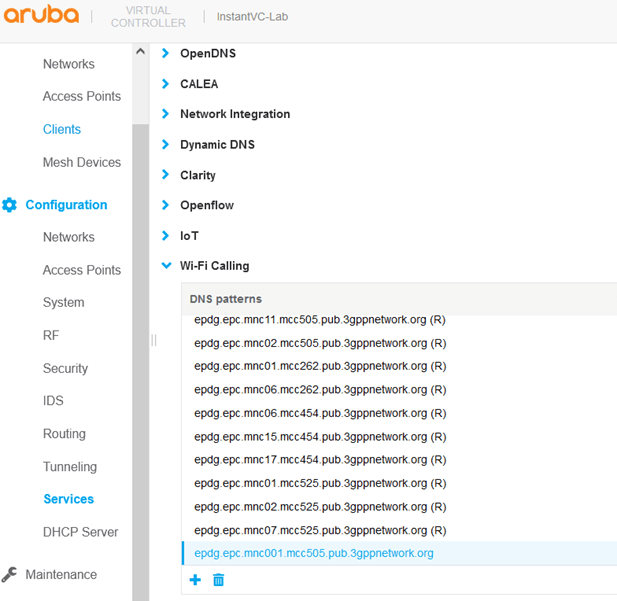
After a while when I check dns-ip-learning, I can see the Carrier name.
PS-Lvl1-b2:5b# sh datapath dns-ip-learning
DNS IP               Carrier
------------------- -----------
101.168.246.65       - Telstra Corp. Ltd.

PS-Lvl1-b2:5b#
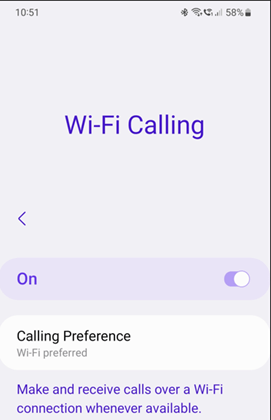
Now going back to my S20 Phone, I’ll see the VoWiFi symbol on my S20 phone and then I’ll make a call.

That will result in the following.
PS-Lvl1-b2:5b# sh datapath session ucc | inc V
       C - client, M - mirror, V – VOIP

Source IP         Destination IP  Prot SPort Dport Cntr Prio ToS Age Destination TAge Packets Bytes Flags  Offload flags Codec
----------------  --------------  ---- ----- ----- ---- ---- --- --- ----------- ---- ------  ----  ----  -------

101.168.246.65    192.168.1.145   17   4500  40051 0    0    46  0   dev31       15b  2a6     1b7d8 FHPTCVL               G711

192.168.1.145     101.168.246.65  17   40051 4500  0    0    46  0   dev31       15b  1ab     11530 FHPTCVL               G711

PS-Lvl1-b2:5b#
Here we see the correct ToS marking of 46. But you’ll notice that the CoS values are 0. Next we’ll add a marking rule to get that marked as well.

Note that my Phone has currently the user-role of Android, that’s why I am adding this rule to it.
Now when we make another Wi-Fi call, the CoS values are also marked correctly.
PS-Lvl1-b2:5b# sh datapath session ucc | inc V
       C - client, M - mirror, V – VOIP

Source IP         Destination IP  Prot SPort Dport Cntr Prio ToS Age Destination TAge Packets Bytes Flags  Offload flags Codec
----------------  --------------  ---- ----- ----- ---- ---- --- --- ----------- ---- ------  ----  ----  -------
101.168.246.65    192.168.1.145   17   4500  40051 0    6    46  0   dev31       15b  2a6     1b7d8 FHPTCVL               G711

192.168.1.145     101.168.246.65  17   40051 4500  0    6    46  0   dev31       15b  1ab     11530 FHPTCVL               G711

PS-Lvl1-b2:5b#
 Solutions Tech Lab
Leave a comment