
Here we’ll use Link Aggregation Control Protocol (LACP) to increase the resiliency and bandwidth for Aruba Controllers. We’ll start with the switch configuration.
Switch Configuration
Here is the LACP configuration for Aruba 2930F AOS-S switch.
Aruba-2930F-12G-PoEP-2G-2SFPP(config)# trunk 13-14 trk2 lacp
Aruba-2930F-12G-PoEP-2G-2SFPP(config)# vlan 192 untagged trk2
Aruba-2930F-12G-PoEP-2G-2SFPP(config)# vlan 11
Aruba-2930F-12G-PoEP-2G-2SFPP(vlan-11)# tag trk2
Aruba-2930F-12G-PoEP-2G-2SFPP(vlan-11)# vlan 12
Aruba-2930F-12G-PoEP-2G-2SFPP(vlan-12)# tag trk2
Aruba-2930F-12G-PoEP-2G-2SFPP(vlan-12)# vlan 13
Aruba-2930F-12G-PoEP-2G-2SFPP(vlan-13)# tag trk2
Aruba-2930F-12G-PoEP-2G-2SFPP(vlan-13)#
Controller Configuration
Here we are covering the configuration of the controller with enabling jumbo frames. Note that you need to enable jumbo frames on your LAN switches between APs and the controllers/MDs.

Then we’ll configure LACP for the interfaces.
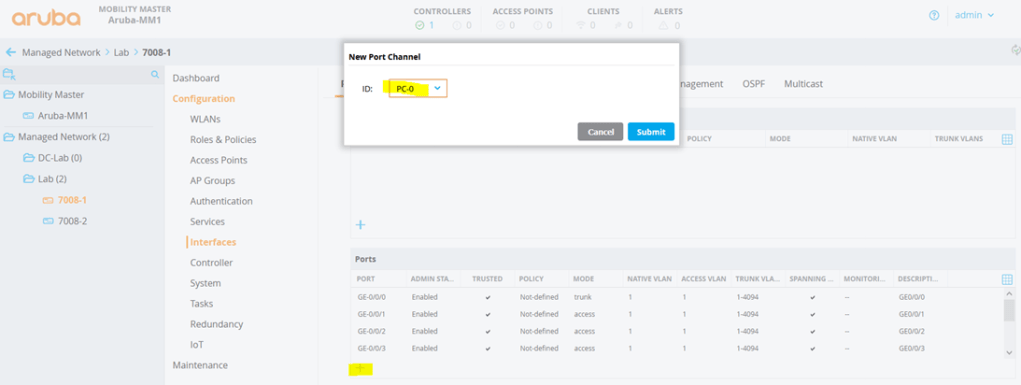
It is recommended to use jumbo frames.
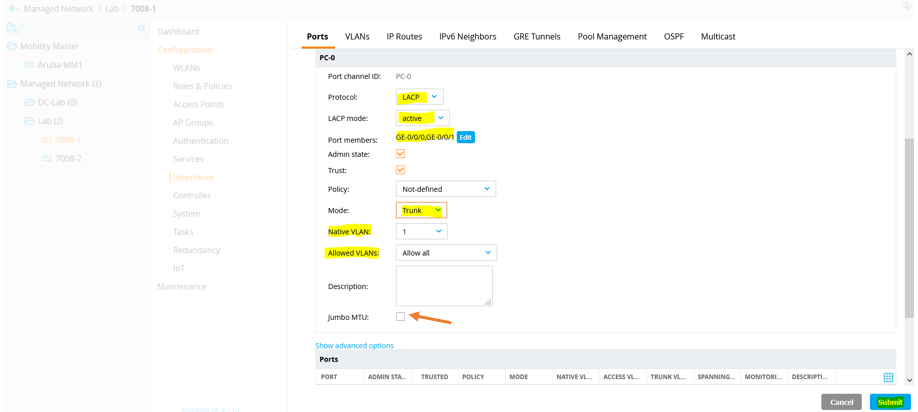
Testing
Here is the Web UI showing that the ports are up.
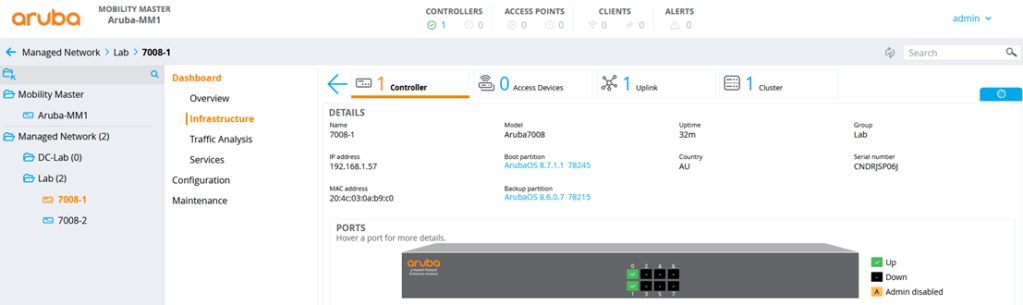
But more specific commands are run from CLI.
(7008-1) #show port status

Port Status
-----------
Slot-Port  PortType  AdminState  OperState  PoE      Trusted  SpanningTree  PortMode  Speed   Duplex  PortError
---------  --------  ----------  ---------  ---      -------  ------------  --------  -----   ------  ---------
0/0/0      GE        Enabled     Up         Enabled  N/A      N/A           PC0       1 Gbps  Full    -
0/0/1      GE        Enabled     Up         Enabled  N/A      N/A           PC0       1 Gbps  Full    -
0/0/2      GE        Enabled     Down       Enabled  Yes      Disabled      Access    Auto    Auto    -
0/0/3      GE        Enabled     Down       Enabled  Yes      Disabled      Access    Auto    Auto    -
0/0/4      GE        Enabled     Down       Enabled  Yes      Disabled      Access    Auto    Auto    -
0/0/5      GE        Enabled     Down       Enabled  Yes      Disabled      Access    Auto    Auto    -
0/0/6      GE        Enabled     Down       Enabled  Yes      Disabled      Access    Auto    Auto    -
0/0/7      GE        Enabled     Down       Enabled  Yes      Disabled      Access    Auto    Auto    -
PC0        PC        Enabled     Up         N/A      Yes      Forwarding    Trunk     N/A     N/A     -

(7008-1) #
Let’s see the LACP status. The flags are as shown here.
- S – Device is requesting slow LACPDUs
- F – Device is requesting fast LACPDUs
- A – Device is in Active mode P – Device is in Passive mode
(7008-1) #show lacp summary

LACP 0
LACP Counter Table
------------------
Port      PDUTx  PDURx  MrkTx  MrkRx  MrkRspTx  MrkRspRx  ErrPktRx  Age   Ena  Dis
----      -----  -----  -----  -----  --------  --------  --------  ---   ---  ---
GE 0/0/0  10     12     0      0      0         0         0         214s  1    0
GE 0/0/1  4      6      0      0      0         0         0         36s   1    0

LACP Neighbor Table
-------------------
Port      Flags  Pri  OperKey  State  Num  Dev Id
----      -----  ---  -------  -----  ---  ------
GE 0/0/0  SA     0    0x215    0x3d   0xe  F8:60:F0:C8:70:E0
GE 0/0/1  SA     0    0x215    0x3d   0xd  F8:60:F0:C8:70:E0

LACP Internal Table
-------------------
Port      Flags  Pri  AdminKey  OperKey  State  Num  Status
----      -----  ---  --------  -------  -----  ---  ------
GE 0/0/0  SA     255  0x1       0x1      0x3d   0x1  up
GE 0/0/1  SA     255  0x1       0x1      0x3d   0x2  up

(7008-1) #
(7008-1) #show trunk
Trunk Port Table
-----------------
Port  Vlans Allowed  Vlans Active  Native Vlan
----  -------------  ------------  -----------
Pc 0  ALL            1,12,20,30    1

(7008-1) #
Here is the Aruba LAN switch view of LACP.
Aruba-2930F-12G-PoEP-2G-2SFPP# sh lacp

                                    LACP

           LACP      Trunk     Port                LACP      Admin   Oper
   Port    Enabled   Group     Status    Partner   Status    Key     Key
   -----   -------   -------   -------   -------   -------   ------  ------
   11      Active    Trk1      Down      No        Success   0       532
   12      Active    Trk1      Down      No        Success   0       532
   13      Active    Trk2      Up        Yes       Success   0       533
   14      Active    Trk2      Up        Yes       Success   0       533


Aruba-2930F-12G-PoEP-2G-2SFPP#
Aruba-2930F-12G-PoEP-2G-2SFPP# sh vlan ports trk2 detail

 Status and Counters - VLAN Information - for ports Trk2

  VLAN ID Name                 | Status     Voice Jumbo Mode
  ------- -------------------- + ---------- ----- ----- --------
  12      VLAN12               | Port-based No    No    Tagged
  20      VLAN20               | Port-based No    No    Tagged
  30      VLAN30               | Port-based No    No    Tagged
  192     VLAN192              | Port-based No    No    Untagged

Aruba-2930F-12G-PoEP-2G-2SFPP#
 Solutions Tech Lab
Leave a comment