
You can enable remote packet capture in Aruba Instant APs like how you do it with Aruba controllers/gateways.
First SSH to an Instant AP (IAP) and search for the Basic Service Set Identifier (BSSID) for access point using “show ap monitor status” command.
BLDG-A-ATV1# show ap monitor status

AP Info
-------
key           value
---           -----
Uptime        190656
AP Name       BLDG-A-ATV1
LMS IP        0.0.0.0
Master IP     0.0.0.0
AP Type       303H
Country Code  15

Wired Interface
----------------
mac                ip             gw-ip        gw-mac             status  pkts   macs  gw-macs  dot1q-pkts  vlans
---                --             -----        ------             ------  ----   ----  -------  ----------  -----
20:4c:03:23:a7:c0  192.168.1.121  192.168.1.1  14:5f:94:81:56:26  enable  38586  4     1        0           0

WLAN Interface
---------------
bssid              scan    monitor  probe-type  phy-type        task   channel  pkts      max-ap-cl-delay  max-sta-cl-delay  reinit-cnt  last-reinit-time  is_mz
-----              ----    -------  ----------  --------        ----   -------  ----      ---------------  ----------------  ----------  ----------------  -----
24:f2:7f:d5:fa:d0  enable  enable   sap         80211a-VHT-80   tuned  149E     14805450  supp             -                 2           52                N
24:f2:7f:d5:fa:c0  enable  enable   sap         80211b/g-HT-20  tuned  1        38073072  supp             -                 2           52                N

WLAN packet counters
---------------------
Interface                 Packets Read  Bytes Read  Interrupts  Buffer Overflows  Max PPS  Cur PPS  Max PPI  Cur PPI
---------                 ------------  ----------  ----------  ----------------  -------  -------  -------  -------
24:f2:7f:d5:fa:d0(wifi0)  14805450      946732584   10073370    325               8576     265      20       1
24:f2:7f:d5:fa:c0(wifi1)  38073072      3071176031  30068022    93                4918     453      20       1

WLAN packet stats
------------------
Interface                 Inv OTA  Inv VBR  Low SNR  Zero Len  NF/Chutil/CCA     Inv Len
---------                 -------  -------  -------  --------  -------------     -------
24:f2:7f:d5:fa:d0(wifi0)  0        0        0        0         1920828/123210/0  0
24:f2:7f:d5:fa:c0(wifi1)  0        0        0        0         1922743/102783/0  0

WLAN packet counters for DATA
------------------------------
Interface                 Data Pkts  Data Bytes  Data Max PPS  Data Cur PPS  Data Max BPS  Data Cur BPS
---------                 ---------  ----------  ------------  ------------  ------------  ------------
24:f2:7f:d5:fa:d0(wifi0)  2525158    223226292   2759          58            238444        5772
24:f2:7f:d5:fa:c0(wifi1)  1202495    106512492   680           2             67940         160

WLAN packet counters for MGMT
------------------------------
Interface                 MGMT Pkts  MGMT Bytes  MGMT Max PPS  MGMT Cur PPS  MGMT Max BPS  MGMT Cur BPS
---------                 ---------  ----------  ------------  ------------  ------------  ------------
24:f2:7f:d5:fa:d0(wifi0)  1179621    286761940   477           12            155760        3472
24:f2:7f:d5:fa:c0(wifi1)  4802045    1282061832  107           28            36796         6944

WLAN packet counters for CTRL
------------------------------
Interface                 CTRL Pkts  CTRL Bytes  CTRL Max PPS  CTRL Cur PPS  CTRL Max BPS  CTRL Cur BPS
---------                 ---------  ----------  ------------  ------------  ------------  ------------
24:f2:7f:d5:fa:d0(wifi0)  3334506    92429584    2259          48            59992         1536
24:f2:7f:d5:fa:c0(wifi1)  21601680   479077024   3038          56            67360         1112

RX WLAN packet counters for AGGR
---------------------------------
Interface                 FIRST AGGR  MIDDLE AGGR  LAST AGGR  NON AGGR  FILTERED AGGR
---------                 ----------  -----------  ---------  --------  -------------
24:f2:7f:d5:fa:d0(wifi0)  0           0            102493     1304682   102528
24:f2:7f:d5:fa:c0(wifi1)  0           7            40984      912489    86556

TX WLAN packet counters for AGGR
---------------------------------
Interface                 FIRST AGGR  MIDDLE AGGR  LAST AGGR  NON AGGR  FILTERED AGGR
---------                 ----------  -----------  ---------  --------  -------------
24:f2:7f:d5:fa:d0(wifi0)  0           0            0          1117983   0
24:f2:7f:d5:fa:c0(wifi1)  0           0            0          249015    0

Data Structures
----------------
ap  sta  pap  psta-a  psta-g  ch  msg-hash  ap-l
--  ---  ---  ------  ------  --  --------  ----
31  41   0    3       48      34  3         31

Other Parameters
-----------------
key                   value
---                   -----
Classification        enable
Wireless Containment  disable
Wired Containment     disable
Rogue Containment     disable

System OUI Table
-----------------
oui
---

RTLS Configuration and State
-----------------------------
Type       Server IP  Port  Freq  Active  Rpt-Tags  Tag-Mcast-Addr     Tags-Sent  Rpt-Sta  Incl-Unassoc-Sta  Sta-Sent  Cmpd-Msgs-Sent  CM
----       ---------  ----  ----  ------  --------  --------------     ---------  -------  ----------------  --------  --------------  --
MMS        N/A        N/A   30            disable   01:0c:cc:00:00:00  N/A        disable  N/A               N/A       N/A             N/A
Aeroscout  N/A        N/A   N/A           disable   00:00:00:00:00:00  N/A        disable  N/A               N/A       N/A             N/A
RTLS       N/A        N/A   30            disable   01:18:8e:00:00:00  N/A        disable  N/A               N/A       N/A             enable

AM Timer States
----------------
Name              State  Last Tick  Function                      Line
----              -----  ---------  --------                      ----
STATS_V2_TIMER    Added  190631     am_set_stats_v2_update_timer  3651
AM_TIMER          Added  0          am_internal_init              3663
SPEC_MILLI_TIMER  Added  0          am_internal_init              3689

BLDG-A-ATV1#
As you have noticed, there is a BSSID for each band (2.4GHz and 5GHz). We’ll use the one for 5GHz band and start the packet capture by sending it to my laptop which is 192.168.1.133 (that is running wireshark) on port 5555. The number after that selects the format type
- 0 – pcap
- 1 – peek
- 2 – airmagnet
- 3 – pcap radio
- 4 – ppi
- 5 – peek with 11n/11ac header
- 6 – radiotap
BLDG-A-ATV1# pcap start 24:f2:7f:d5:fa:d0 192.168.1.133 5555 3 5000

Packet capture has started for pcap-id:5

BLDG-A-ATV1#
BLDG-A-ATV1#
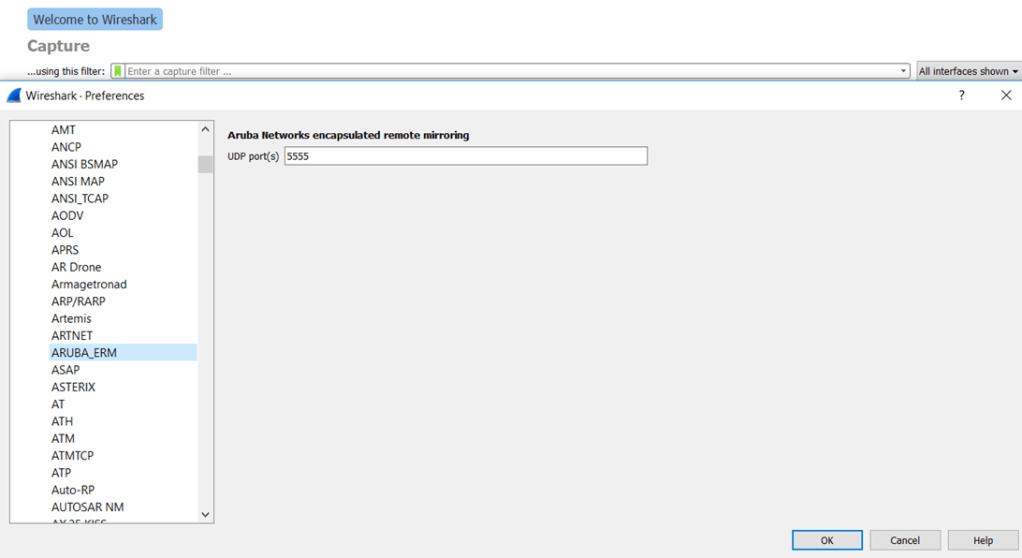
Now using wireshark, Edit the preferences->Protocols of Wireshark and set Aruba ERM preferences as shown (in the protocol section) and set the USDP port to 5555.
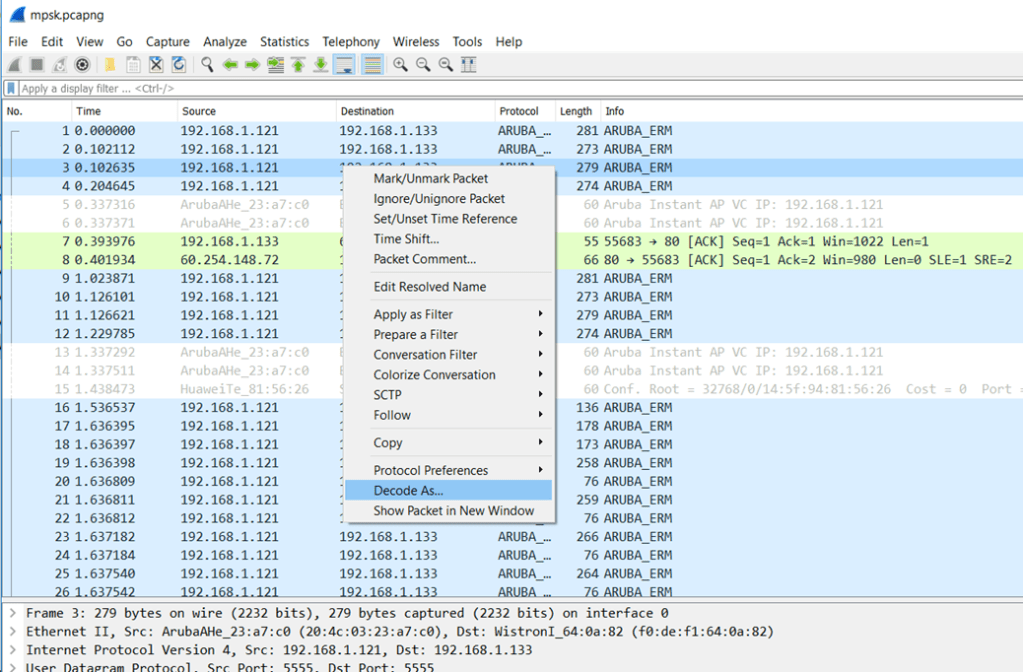
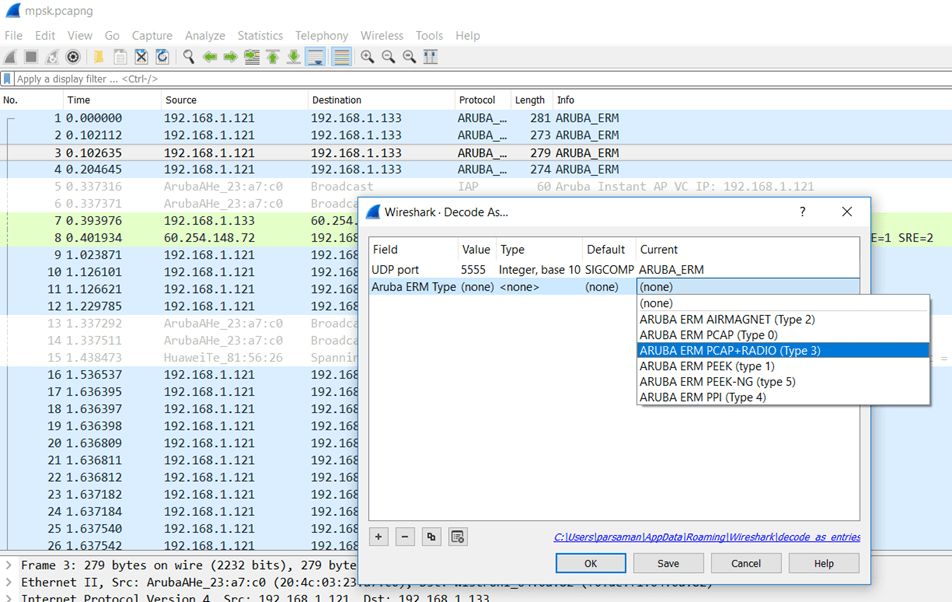
Now when you receive the Aruba_ERM packets from the IAP, you need to right click on one of them and select “decode as” Type 3. Type 3 is with Radio headers as well.
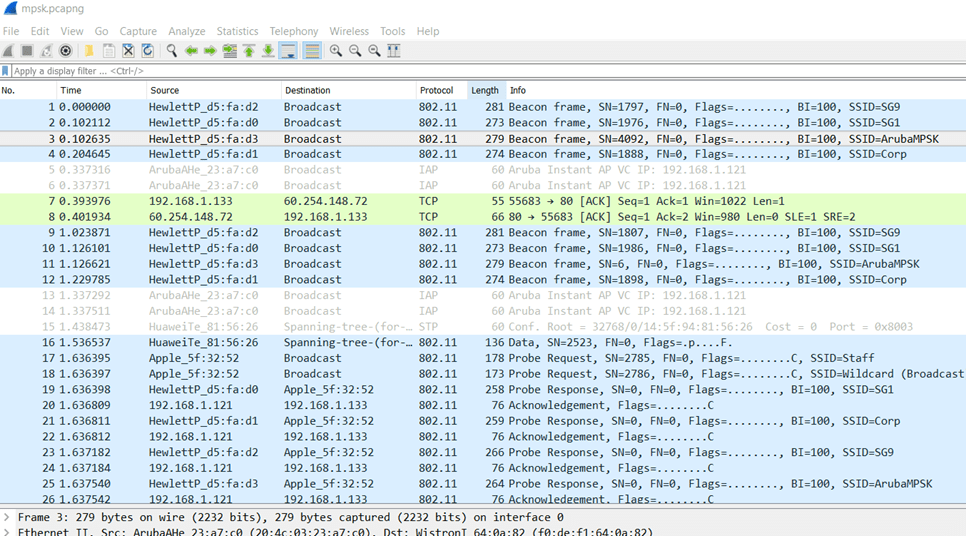
And then the display changes and you can see the 802.11 info as seen below.
To display the list of remote pcap sessions, you can use the following command:
show pcap status
BLDG-A-ATV1# sh pcap status

Packet Capture Sessions at BLDG-A-ATV1, IP 192.168.1.121
--------------------------------------------------------
pcap-id  filter  type  intf               channel  max-pkt-size  num-pkts  status       url  target              Radio ID
-------  ------  ----  ----               -------  ------------  --------  ------       ---  ------              --------
5                raw   24:f2:7f:d5:fa:d0  149      5000          307       in-progress       192.168.1.133/5555  0

BLDG-A-ATV1#
BLDG-A-ATV1#
and finally to stop the remote pcap session, use this command “pcap stop BSSID ID”
BLDG-A-ATV1# pcap stop 24:f2:7f:d5:fa:d0 5

Packet capture has stopped for pcap-id:5

BLDG-A-ATV1#
 Solutions Tech Lab
Leave a comment