
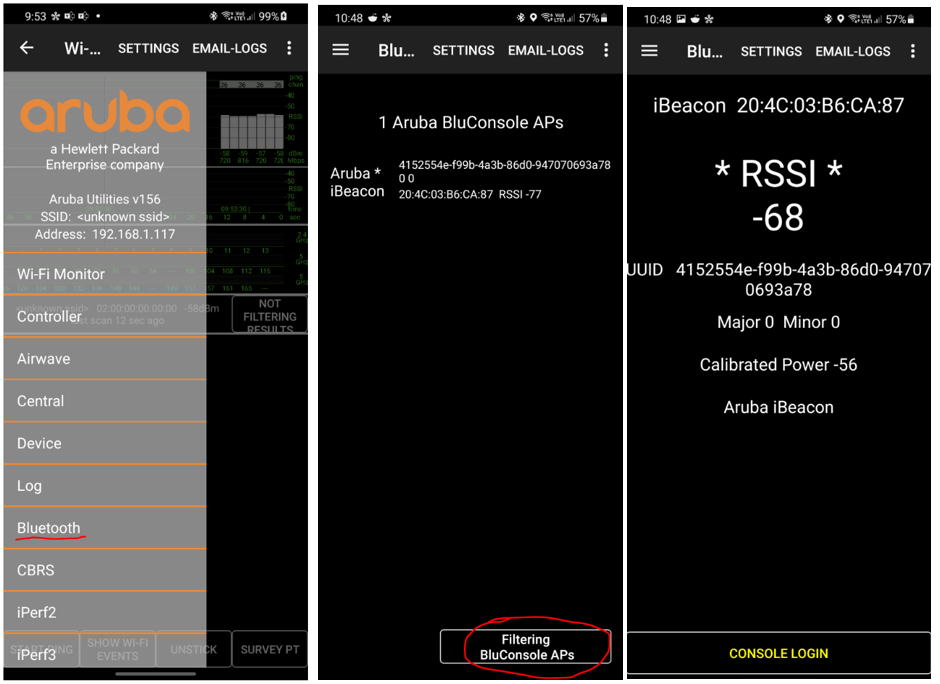
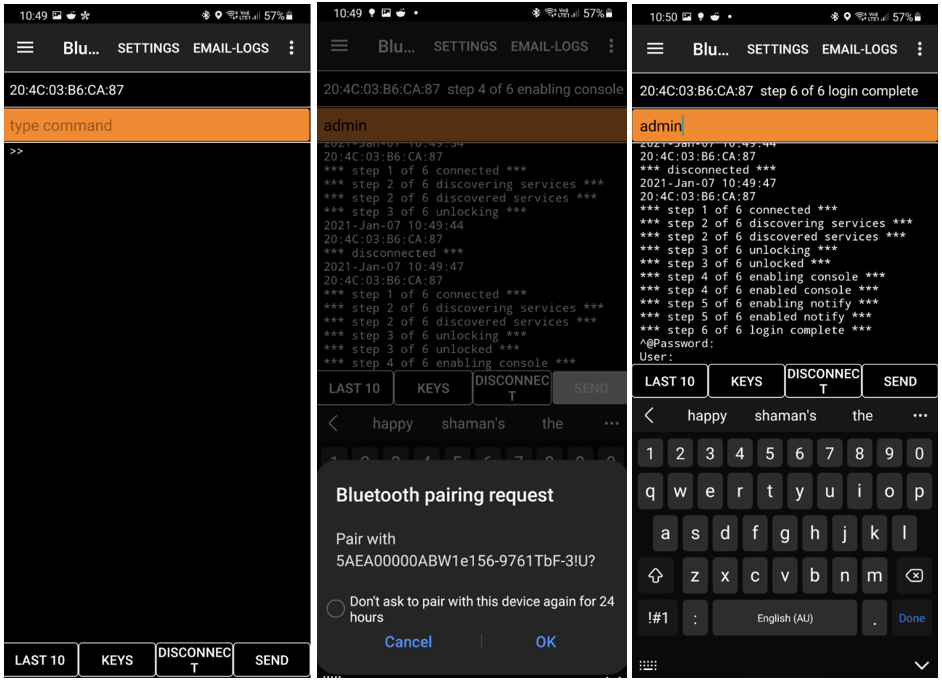
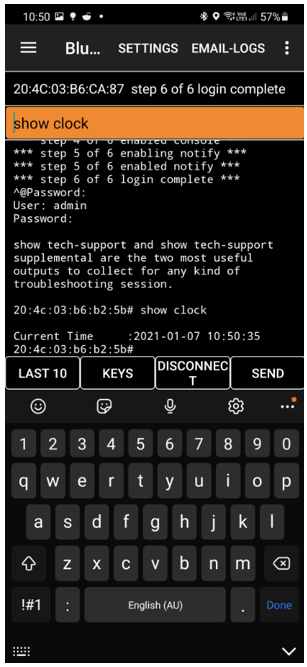
Since most of the Aruba APs have inbuilt Bluetooth beacons, we could use it to have console access to the APs. For this you need Aruba utilities on Android devices or BLUConsole app on iOS devices, starting with Instant firmware version 8.6.X.
Instant AP Configuration
Here we are using AP-505H with instant firmware version 8.7.1.1
20:4c:03:b6:b2:5b# sh ver
Aruba Operating System Software.
ArubaOS (MODEL: 505H), Version 8.7.1.1
Website: http://www.arubanetworks.com
(c) Copyright 2020 Hewlett Packard Enterprise Development LP.
Compiled on 2020-12-15 at 03:30:19 UTC (build 78245) by p4build
FIPS Mode :disabled

AP uptime is 1 day 1 hour 26 minutes 51 seconds
Reboot Time and Cause: AP rebooted Thu Jan 7 08:41:09 EST 2021; CLI cmd at uptime 21D 20H 27M 23S: reload

20:4c:03:b6:b2:5b#
All you need to configure is to add the following through the CLI
iot radio-profile Console
 radio-mode ble
 ble-opmode beaconing
 ble-console on

iot use-radio-profile Console
Here are the show commands
20:4c:03:b6:b2:5b# sh ap deb ble-config


============================================================
                     IOT Radio Profiles
============================================================
Profile Name        : Console
Radio Instance      : Internal
Radio Mode          : BLE
BLE Mode            : beaconing
BLE Console         : On
BLE Tx Power (dBm)  : 0
-----------------------------------------------
============================================================
                  Zigbee Service Profiles
============================================================
No Zigbee service profiles currently configured.
============================================================
                      Attached Radios
============================================================
Radio Configuration
-------------------
Item                          Value
----                          -----
Radio Information             NORDIC ONBOARD Internal BLE Zigbee
Radio Profile Type            1
Zigbee Supported              No
APB MAC Address               20:4c:03:b6:ca:87
APB Radio Profile             0x0019
APB Radio TxPower             0
Operational BluOS FW Version  DFU App 1.3-69
Bundled BluOS Upgrade         Enabled (-1)
Device Connected to APB       Yes
Bundled BluOS Images          DFU BL(/aruba/bin/beacon_ap_dfu-sdbl_1.3-69.bin) DFU APP(/aruba/bin/beacon_ap_dfu-app_1.3-69.bin)
OTA FW BluOS Upgrade          Disabled
-----------------
============================================================
                        Misc. Config
============================================================
Miscellaneous Configuration
---------------------------
Item                            Value
----                            -----
FIPS Mode                       No
Master IP                       127.0.0.1
BLE Ready                       Yes
Coex Inputs                     2 0 0
APB Info Update Intvl (in sec)  80 (8043/8009)
BLE debug log                   Disabled
Message Selector                0xffff (APB: 0xffff)
AP Deep Sleep Duration          120 minutes
AP USB Power Override           Disabled (-1)
Uplink Status                   Up
Time Last Message to APB        1970-01-01 11:00:00
Current Log Level               { 0x901e1 : Error(0x0001), FW-Upgrade(0x0020), FW-UpgradeErr(0x0040), CfgUpdate(0x0080), CfgUpdateErr(0x0100), IOT-GW(0x10000) }
Log Mac Filter                  None
-----------------
============================================================
                   IOT Transport Profiles
============================================================
No IoT Transport context currently configured. Config ID:0

===========================================================
Notes: - Setting Message Selector value to 0x0 will cause the APB to function improperly. Use the knob with caution.

       - Uplink status is applicable only when console is set to dynamic

Log Levels Availible: { All(0x1fffff), Info(0x04), Warning(0x02), Error(0x01), Ageout(0x08), BMReq(0x10), FW-Upgrade(0x20), FW-UpgradeErr(0x40), CfgUpdate(0x80), CfgUpdateErr(0x100), Beacon(0x200), BcnTLV(0x400), BcnErr(0x800), APB(0x1000), Tags(0x2000), ZF(0x4000), AMON(0x8000), IOT-GW(0x10000), AT-HTTPS-JSON(0x20000), AT-WEBSOCKET-PROTOBUF(0x40000), Enocean(0x100000), None(0x00) }

20:4c:03:b6:b2:5b#
you can also check the AP BLE database, that displays AP Beacon (APB) information collected by BLE relay
20:4c:03:b6:b2:5b# show ap deb ble-database

BLE APB Information
-------------------
AP Name            AP Group  BLE MAC            Radio Type  BLE Cur. Bank   BLE Opp. Bank  AP Eth MAC         AP IP      Reported at           ConfigID  Status
-------            --------  -------            ----------  -------------   -------------  ----------         -----      -----------           --------  ------
20:4c:03:b6:b2:5b            20:4c:03:b6:ca:87  Internal    DFU APP 1.3-69  DFU BL  0.0-0  20:4c:03:b6:b2:5b  127.0.0.1  2021-01-08 10:12:33   0         Current

Total AP BLE devices reported:1
Note:'Status' column indicates whether information received for an AP's
    : BLE radio is 'Current' (message received in the last 10 minutes)
    : or 'OutOfDate' (message received more than last 10 minutes ago and/or AP might be down).

20:4c:03:b6:b2:5b#
Aruba Utilities App Configuration
Aruba Utilities is an app in GooglePlay that includes several useful tools for characterizing and troubleshooting wireless LANs from Aruba Networks. Some tools work with any WLAN, others are clients for Aruba’s AirWave management system, Beacons, Analytics & Location Engine (ALE) and Mobility Controllers.
 Solutions Tech Lab
Leave a comment